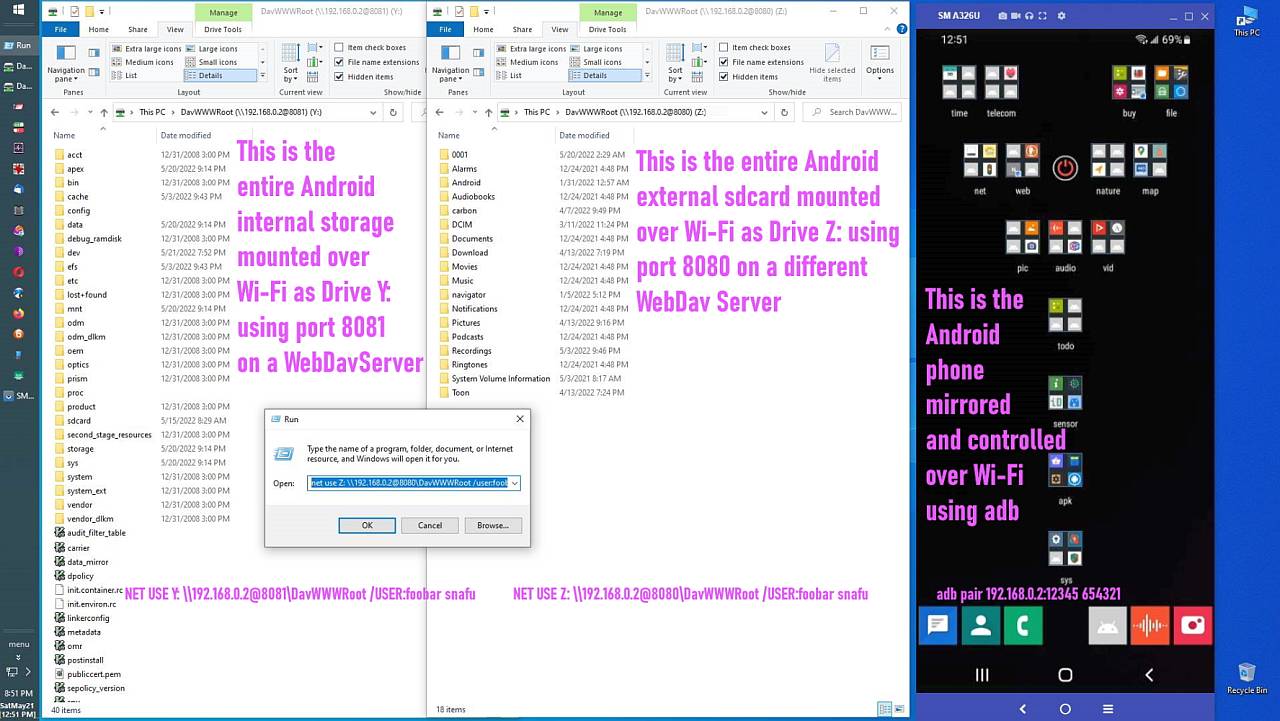
WEBDAV ON WINDOWS
1. Windows includes a native WebDAV filesystem redirector called WebClient.
2. Because the redirector is built in, Windows can mount WebDAV as a real
network drive with a drive letter.
3. No third-party tools are required.
Maria Sophia wrote:
WEBDAV ON WINDOWS
1. Windows includes a native WebDAV filesystem redirector called WebClient. >>
2. Because the redirector is built in, Windows can mount WebDAV as a real
' network drive with a drive letter.
3. No third-party tools are required.
N.B. Windows built-in webDAV client is deprecated, and I can see why.
I used to run a daily task that synchronised data from a sharepoint
library, to a PC (and then to an SFTP server via WinSCP).
The WebDAV part would find a novel way of b0rking every few months ...
a. The built-in WebClient service is considered legacy by Microsoft.
net use Z: \\192.168.1.2@8080\DavWWWRoot
net use Z: /delete
1. Windows includes a native FTP client, but it does not include an FTP
filesystem redirector.
2. Because there is no redirector, Windows cannot mount an FTP server as a
drive letter.
3. Windows Explorer can open an FTP server as a virtual folder.
This is called a Network Location, not a Network Drive.
Maria Sophia wrote:
a. The built-in WebClient service is considered legacy by Microsoft.
Even so, it has been working for me on Windows 10 for, oh, 5 years or so.
Maria Sophia wrote:
a. The built-in WebClient service is considered legacy by Microsoft.
Even so, it has been working for me on Windows 10 for, oh, 5 years or so.
Yes - but Windows 10 itself is also legacy now and for Windows 11
Microsoft did not improve anything for the WebDAV support.
Arno Welzel wrote:
Maria Sophia wrote:Yes - but Windows 10 itself is also legacy now and for Windows 11
a. The built-in WebClient service is considered legacy by Microsoft.
Even so, it has been working for me on Windows 10 for, oh, 5 years or so. >>
Microsoft did not improve anything for the WebDAV support.
Yes... but... all you need is the file explorer and "net use" & that works.
<https://i.postimg.cc/BvJdKWzt/webdav06.jpg>
You can't mount the Android filesystem as a Windows drive letter with FTP (unless you add third-party software). But WebDAV needs no software.
Having the Android phone as a Windows drive has huge advantages, e.g., the Windows file explorer can save DIRECTLY from Windows to Android in 1 step.
You can't mount the Android filesystem as a Windows drive letter with FTP
(unless you add third-party software). But WebDAV needs no software.
The issue with WebDAV in Windows is, that it does not work realiable.
Having the Android phone as a Windows drive has huge advantages, e.g., the >> Windows file explorer can save DIRECTLY from Windows to Android in 1 step.
Using the Windows file explorer you don't need a drive letter at all.
That's the reason, why namespaces exist in the explorer - to be able to access locations even when they don't have a drive letter.
A drive letter is only useful if you want to access the data in *other* applications besides the Windows file explorer which *require* a drive letter.
net use Z: \\192.168.1.2@8000\DavWWWRoot /USER:joe * /PERSISTENT:YES
Maria Sophia, 2026-01-27 18:11:
[...]
1. Windows includes a native FTP client, but it does not include an FTP
filesystem redirector.
2. Because there is no redirector, Windows cannot mount an FTP server as a >> drive letter.
3. Windows Explorer can open an FTP server as a virtual folder.
This is called a Network Location, not a Network Drive.
This is called a "Shell namespace".
Also see: <https://en.wikipedia.org/wiki/Windows_Shell_namespace>
net use Z: \\192.168.1.2@8000\DavWWWRoot /USER:joe * /PERSISTENT:YES
net use Z: /delete
| Sysop: | DaiTengu |
|---|---|
| Location: | Appleton, WI |
| Users: | 1,096 |
| Nodes: | 10 (0 / 10) |
| Uptime: | 402:14:40 |
| Calls: | 14,036 |
| Files: | 187,082 |
| D/L today: |
203 files (75,284K bytes) |
| Messages: | 2,479,256 |