A prior post mentioned the use of Zerofree, but it has to be done on unmounted partitions. Today, I brought out an old LiveDVD with 16.04 on
it then installed Zerofree via apt. I then listed the partitions and
found the one I needed, /dev/sdb2, but trying to run sudo zerofree
/dev/sdb2, I get the following error: failed to open file system:
/dev/sdb2.
One of my other tasks, aside from the cleansing of Win drives using Sdelete and other tools, was to also cleanse the free space of Ubuntu partitions.
A prior post mentioned the use of Zerofree, but it has to be done on unmounted partitions. Today, I brought out an old LiveDVD with 16.04 on it then installed Zerofree via apt. I then listed the partitions and found the one I needed, /dev/sdb2, but trying to run sudo zerofree /dev/sdb2, I get the following error: failed to open file system: /dev/sdb2. I then tried to create a mount point (mkdir: /mnt/temp) and then mounted /dev/sdb2 onto that point, but a new error about something not in GRUB.
Suggestions welcome for getting this up and running and thanks in advance.
On Mon, 3/30/2026 4:46 PM, George Garth wrote:
One of my other tasks, aside from the cleansing of Win drives using Sdelete and other tools, was to also cleanse the free space of Ubuntu partitions.
A prior post mentioned the use of Zerofree, but it has to be done on unmounted partitions. Today, I brought out an old LiveDVD with 16.04 on it then installed Zerofree via apt. I then listed the partitions and found the one I needed, /dev/sdb2, but trying to run sudo zerofree /dev/sdb2, I get the following error: failed to open file system: /dev/sdb2. I then tried to create a mount point (mkdir: /mnt/temp) and then mounted /dev/sdb2 onto that point, but a new error about something not in GRUB.
Suggestions welcome for getting this up and running and thanks in advance.
My notes file says:
sudo zerofree -v /dev/sdb1 # fill with zeros, before compaction in host
# /dev/sdb1 should not be mounted when you run it
*******
Do a "df" or a "cat /etc/mtab" and check what is mounted, as
/dev/sdb1 should not be mounted for the example to work.
*******
https://manpages.ubuntu.com/manpages/focal/man8/zerofree.8.html
zerofree - zero free blocks from ext2, ext3 and ext4 file-systems
-n Perform a dry run (do not modify the file-system);
-v Be verbose: show the number of blocks modified by zerofree (or that would be modified, in case
the -n is used), the number of free blocks and the total number of blocks on the filesystem;
-f value Specify the octet value to fill empty blocks with (defaults to 0). Argument must be within the
range 0 to 255.
Paul
Booted into Ubuntu from a USB for a session. Did a "df" as suggested to find:
https://imgur.com/a/1RR4Yna
On 31/03/2026 09:34, George Garth wrote:
Booted into Ubuntu from a USB for a session. Did a "df" as suggested to find:
https://imgur.com/a/1RR4Yna
"Content Not Available
Content not available in your region.
Learn more about Imgur access in the United Kingdom"
Not helpful :-{
On 31/03/2026 09:34, George Garth wrote:
Booted into Ubuntu from a USB for a session. Did a "df" as suggested
to find:
https://imgur.com/a/1RR4Yna
"Content Not Available
Content not available in your region.
Learn more about Imgur access in the United Kingdom"
Not helpful :-{
On 3/30/26 8:17 PM, Paul wrote:
On Mon, 3/30/2026 4:46 PM, George Garth wrote:
One of my other tasks, aside from the cleansing of Win drives using
Sdelete and other tools, was to also cleanse the free space of Ubuntu
partitions.
A prior post mentioned the use of Zerofree, but it has to be done on
unmounted partitions. Today, I brought out an old LiveDVD with 16.04
on it then installed Zerofree via apt. I then listed the partitions >>> and found the one I needed, /dev/sdb2, but trying to run sudo
zerofree /dev/sdb2, I get the following error: failed to open file
system: /dev/sdb2. I then tried to create a mount point (mkdir: /
mnt/temp) and then mounted /dev/sdb2 onto that point, but a new error
about something not in GRUB.
Suggestions welcome for getting this up and running and thanks in
advance.
My notes file says:
sudo zerofree -v /dev/sdb1 # fill with zeros, before compaction in host
# /dev/sdb1 should not be mounted when
you run it
*******
Do a "df" or a "cat /etc/mtab" and check what is mounted, as
/dev/sdb1 should not be mounted for the example to work.
*******
https://manpages.ubuntu.com/manpages/focal/man8/zerofree.8.html
zerofree - zero free blocks from ext2, ext3 and ext4 file-systems
-n Perform a dry run (do not modify the file-system);
-v Be verbose: show the number of blocks modified by
zerofree (or that would be modified, in case
the -n is used), the number of free blocks and the
total number of blocks on the filesystem;
-f value Specify the octet value to fill empty blocks with
(defaults to 0). Argument must be within the
range 0 to 255.
Paul
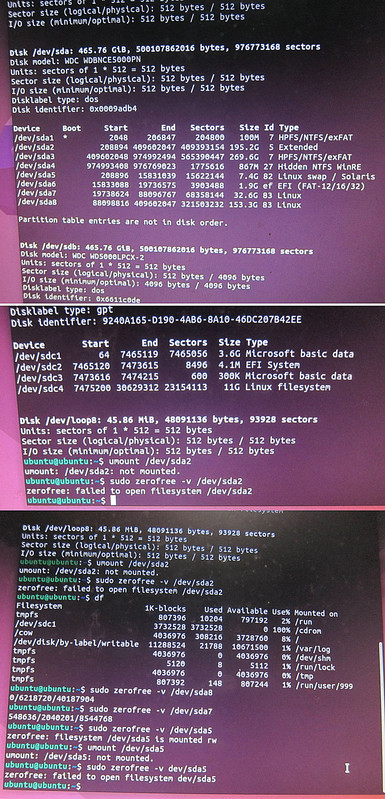
Ok, well, I finally got it to run.... sort of. I'll try to explain. I'm not all that well versed in Linux particulars other than plug and play,
but here goes....
Booted into Ubuntu from a USB for a session. Did a "df" as suggested to find:
https://imgur.com/a/1RR4Yna
Unmount /dev/sda2 to be sure and then tried to run Zerofree:
https://imgur.com/a/IkkZCWb
The only way I could get Zerofree to run was to do:
sudo zerofree -v /dev/sda8 and then the same except for sda7.
Tried the swap as well but to no avail:
https://imgur.com/a/r6eaAoT
So, my guess is that the program is not recognizing the extended sda2
for some reason. I'm going to assume that since I was able to use it on sda7 & 8, I should be ok, but why not working for the swap?
On 31.03.26 10:34, George Garth wrote:
On 3/30/26 8:17 PM, Paul wrote:
On Mon, 3/30/2026 4:46 PM, George Garth wrote:
One of my other tasks, aside from the cleansing of Win drives using
Sdelete and other tools, was to also cleanse the free space of
Ubuntu partitions.
A prior post mentioned the use of Zerofree, but it has to be done on
unmounted partitions. Today, I brought out an old LiveDVD with
16.04 on it then installed Zerofree via apt. I then listed the
partitions and found the one I needed, /dev/sdb2, but trying to run
sudo zerofree /dev/sdb2, I get the following error: failed to open
file system: /dev/sdb2. I then tried to create a mount point
(mkdir: / mnt/temp) and then mounted /dev/sdb2 onto that point, but
a new error about something not in GRUB.
Suggestions welcome for getting this up and running and thanks in
advance.
My notes file says:
sudo zerofree -v /dev/sdb1 # fill with zeros, before compaction in host >>> # /dev/sdb1 should not be mounted when
you run it
*******
Do a "df" or a "cat /etc/mtab" and check what is mounted, as
/dev/sdb1 should not be mounted for the example to work.
*******
https://manpages.ubuntu.com/manpages/focal/man8/zerofree.8.html
zerofree - zero free blocks from ext2, ext3 and ext4 file- >>> systems
-n Perform a dry run (do not modify the file-system);
-v Be verbose: show the number of blocks modified by
zerofree (or that would be modified, in case
the -n is used), the number of free blocks and the
total number of blocks on the filesystem;
-f value Specify the octet value to fill empty blocks with
(defaults to 0). Argument must be within the
range 0 to 255.
Paul
Ok, well, I finally got it to run.... sort of. I'll try to explain.
I'm not all that well versed in Linux particulars other than plug and
play, but here goes....
Booted into Ubuntu from a USB for a session. Did a "df" as suggested
to find:
https://imgur.com/a/1RR4Yna
Unmount /dev/sda2 to be sure and then tried to run Zerofree:
https://imgur.com/a/IkkZCWb
The only way I could get Zerofree to run was to do:
sudo zerofree -v /dev/sda8 and then the same except for sda7.
Tried the swap as well but to no avail:
https://imgur.com/a/r6eaAoT
So, my guess is that the program is not recognizing the extended sda2
for some reason. I'm going to assume that since I was able to use it
on sda7 & 8, I should be ok, but why not working for the swap?
First of all: access to the (raw) disks is allowed to the administrator (called "root" in Linux) ONLY. Otherwise anybody could get around the protection mechanisms the file systems provide (*). So running
"zerofree" with "sudo" (run the command as "root") is correct.
Re /dev/sda2: According to the first screen shot, "sda2" is the extended partition and, as such, does not by itself hold a file system. Instead
it holds "logical partitions" which tehn can hold file systems.
Since the only two partitions that hold anything that looks like Linux
file systems are "sda7" and "sda8", these two are the only partitions
that you can run "zerofree" on.
"sda5" is a (Linux) swap-partition and does not hold a file system, so
you cannot fill any free space with zeroes. Thus said, if you run off a
USB stick and you reallyreally want to also wipe the swap partition,
then you could wipe the entire swap partition using "sudo dd if=/dev/
zero of=/dev/sda5 bs=128k" and wait until that is done, this might just
take some time.
IMPORTANT NOTE: CHECK THE COMMAND LINE SEVERAL TIMES TO MAKE SURE YOU ACTUALLY SPECIFY THE SWAP PARTITION!!!! MAYBE ASK SOMEONE ELSE TO CHECK
AS WELL.
Also check if the system you run off the stick is not using the swap partition by running "cat /proc/swaps" (no "sudo" required, checking
what is used as swap is not anything privileged) and check if "/dev/
sda5" is not mentioned. If it is, run "sudo swapoff /dev/sda5" to turn
that off.
Hope this helps,
Josef
(*) When studying CS in the late 70s, one of the tasks in "Operating Systems" was to inspect the file system structure and dump the block addresses of a given disk file. To do that, "/dev/sda" and "/dev/sdb"
were both readable by anybody ("world readable"). It was just a small
step to the dump the contents of those blocks and thus access files that were not readable by anybody but the owner of the file ;-)
On 3/30/26 8:17 PM, Paul wrote:
On Mon, 3/30/2026 4:46 PM, George Garth wrote:
One of my other tasks, aside from the cleansing of Win drives using Sdelete and other tools, was to also cleanse the free space of Ubuntu partitions.My notes file says:
A prior post mentioned the use of Zerofree, but it has to be done on unmounted partitions. Today, I brought out an old LiveDVD with 16.04 on it then installed Zerofree via apt. I then listed the partitions and found the one I needed, /dev/sdb2, but trying to run sudo zerofree /dev/sdb2, I get the following error: failed to open file system: /dev/sdb2. I then tried to create a mount point (mkdir: /mnt/temp) and then mounted /dev/sdb2 onto that point, but a new error about something not in GRUB.
Suggestions welcome for getting this up and running and thanks in advance. >>
sudo zerofree -v /dev/sdb1 # fill with zeros, before compaction in host
# /dev/sdb1 should not be mounted when you run it
*******
Do a "df" or a "cat /etc/mtab" and check what is mounted, as
/dev/sdb1 should not be mounted for the example to work.
*******
https://manpages.ubuntu.com/manpages/focal/man8/zerofree.8.html
zerofree - zero free blocks from ext2, ext3 and ext4 file-systems
-n Perform a dry run (do not modify the file-system);
-v Be verbose: show the number of blocks modified by zerofree (or that would be modified, in case
the -n is used), the number of free blocks and the total number of blocks on the filesystem;
-f value Specify the octet value to fill empty blocks with (defaults to 0). Argument must be within the
range 0 to 255.
Paul
Ok, well, I finally got it to run.... sort of. I'll try to explain. I'm not all that well versed in Linux particulars other than plug and play, but here goes....
Booted into Ubuntu from a USB for a session. Did a "df" as suggested to find:
https://imgur.com/a/1RR4Yna
Unmount /dev/sda2 to be sure and then tried to run Zerofree:
https://imgur.com/a/IkkZCWb
The only way I could get Zerofree to run was to do:
sudo zerofree -v /dev/sda8 and then the same except for sda7.
Tried the swap as well but to no avail:
https://imgur.com/a/r6eaAoT
So, my guess is that the program is not recognizing the extended sda2 for some reason.
I'm going to assume that since I was able to use it on sda7 & 8, I should be ok, but why not working for the swap?
On Tue, 3/31/2026 4:34 AM, George Garth wrote:
On 3/30/26 8:17 PM, Paul wrote:
On Mon, 3/30/2026 4:46 PM, George Garth wrote:
One of my other tasks, aside from the cleansing of Win drives using Sdelete and other tools, was to also cleanse the free space of Ubuntu partitions.My notes file says:
A prior post mentioned the use of Zerofree, but it has to be done on unmounted partitions. Today, I brought out an old LiveDVD with 16.04 on it then installed Zerofree via apt. I then listed the partitions and found the one I needed, /dev/sdb2, but trying to run sudo zerofree /dev/sdb2, I get the following error: failed to open file system: /dev/sdb2. I then tried to create a mount point (mkdir: /mnt/temp) and then mounted /dev/sdb2 onto that point, but a new error about something not in GRUB.
Suggestions welcome for getting this up and running and thanks in advance. >>>
sudo zerofree -v /dev/sdb1 # fill with zeros, before compaction in host >>> # /dev/sdb1 should not be mounted when you run it
*******
Do a "df" or a "cat /etc/mtab" and check what is mounted, as
/dev/sdb1 should not be mounted for the example to work.
*******
https://manpages.ubuntu.com/manpages/focal/man8/zerofree.8.html
zerofree - zero free blocks from ext2, ext3 and ext4 file-systems
-n Perform a dry run (do not modify the file-system);
-v Be verbose: show the number of blocks modified by zerofree (or that would be modified, in case
the -n is used), the number of free blocks and the total number of blocks on the filesystem;
-f value Specify the octet value to fill empty blocks with (defaults to 0). Argument must be within the
range 0 to 255.
Paul
Ok, well, I finally got it to run.... sort of. I'll try to explain. I'm not all that well versed in Linux particulars other than plug and play, but here goes....
Booted into Ubuntu from a USB for a session. Did a "df" as suggested to find:
https://imgur.com/a/1RR4Yna
Unmount /dev/sda2 to be sure and then tried to run Zerofree:
https://imgur.com/a/IkkZCWb
The only way I could get Zerofree to run was to do:
sudo zerofree -v /dev/sda8 and then the same except for sda7.
Tried the swap as well but to no avail:
https://imgur.com/a/r6eaAoT
So, my guess is that the program is not recognizing the extended sda2 for some reason.
I'm going to assume that since I was able to use it on sda7 & 8, I should be ok, but why not working for the swap?
Now that I've had time to bask in the beauty of this mess :-)
This looks like you have installed Ubuntu on the disk. Maybe
you booted then, from the Live Media, as a means of not mounting
the partitions. Note - this was done via OCR and editing, so
there could be errors. I converted the picture.
Device Boot Start End Sectors Size Id Type
/dev/sda1 * 2048 206847 204800 100M 7 HPFS/NTFS/exFAT /dev/sda2 208894 409602047 409393154 195.2G 5 Extended /dev/sda3 409602048 974992494 565390447 269.6G 7 HPFS/NTFS/exFAT /dev/sda4 974993408 976769023 1775616 867M 27 Hidden NTFS WinRE /dev/sda5 208896 15831039 15622144 7.4G 82 Linux swap / Solaris
/dev/sda6 15833088 19736575 3903488 1.9G ef EFI (FAT-12/16/32)
/dev/sda7 19738624 88096767 68358144 32.6G 83 Linux
/dev/sda8 88098816 409602047 321503232 153.3G 83 Linux
That's an MSDOS partitioned disk, with Extended/Logical.
The last four partitions are logicals and fit precisely into the extended declared in sda2. At first I was concerned the disk was "severely overlapped",
but that's because I wasn't parsing it right. I don't think it is overlapped. I was thrown off by the contents of sda6.
But the 0xef as sda6, it looks like the OS was not willing to do a
fallback installation into sda1. sda1 is declared as the boot partition,
by having 0x80 for the boot flag in sda1. The 0xef should not have
been created. *This smells like UBUNTU*. So what would be inside
that 0xef. Probably something we can't use. Now it depends
on what Stage1 boot code is in Sector0, either the Windows MSDOS
boot stage (that looks for the partition with the boot flag), or
the sector could contain a Ubuntu boot sector in Sector0 (which
might look for an EFI partition by type). We would know, based
on which OS boots at startup. If Windows starts and Ubuntu is inaccessible, then Windows uses Sector0. If Ubuntu starts, and OSProber was present,
the Ubuntu GRUB menu could offer both Ubuntu and Windows, and Windows
(maybe) gets chain-loaded if it is selected.
When the Live Media boots, the swap partition will get mounted
when the OS does a "sudo swapon /a" or "use all swap partitions please".
Doing a sudo swapoff /dev/sda5 would cause that partition to be
released. But really, there is no point doing that, because
zerofree only processes EXT2/3/4 and not a swap.
Since sda2 is an Extended partition, there is no file system there.
You cannot zerofree that either. The Extended is a very short allocation
of space. A mere pimple. A couple blocks after that the first Logical starts.
Summary: This setup isn't actually illegal, but the boot process is
unlikely to be the best job ever. I could see this starting
every time, putting up a GRUB menu and so on. But if Canonical
thinks this is going to Secure Boot, I don't think so.
Just when you think you've seen it all.
Paul
On 3/31/26 7:14 AM, Mike Scott wrote:
On 31/03/2026 09:34, George Garth wrote:
Booted into Ubuntu from a USB for a session. Did a "df" as suggested
to find:
https://imgur.com/a/1RR4Yna
"Content Not Available
Content not available in your region.
Learn more about Imgur access in the United Kingdom"
Not helpful :-{
Sorry, no way of knowing that not being in the UK. Anyway, if you can suggest a site that would work, I'll make a reposting with working image links. Thanks.
On 3/31/26 9:07 AM, Paul wrote:
On Tue, 3/31/2026 4:34 AM, George Garth wrote:
On 3/30/26 8:17 PM, Paul wrote:
On Mon, 3/30/2026 4:46 PM, George Garth wrote:
One of my other tasks, aside from the cleansing of Win drives using Sdelete and other tools, was to also cleanse the free space of Ubuntu partitions.
A prior post mentioned the use of Zerofree, but it has to be done on unmounted partitions. Today, I brought out an old LiveDVD with 16.04 on it then installed Zerofree via apt. I then listed the partitions and found the one I needed, /dev/sdb2, but trying to run sudo zerofree /dev/sdb2, I get the following error: failed to open file system: /dev/sdb2. I then tried to create a mount point (mkdir: /mnt/temp) and then mounted /dev/sdb2 onto that point, but a new error about something not in GRUB.
Suggestions welcome for getting this up and running and thanks in advance.
My notes file says:
sudo zerofree -v /dev/sdb1 # fill with zeros, before compaction in host >>>> # /dev/sdb1 should not be mounted when you run it
*******
Do a "df" or a "cat /etc/mtab" and check what is mounted, as
/dev/sdb1 should not be mounted for the example to work.
*******
https://manpages.ubuntu.com/manpages/focal/man8/zerofree.8.html
zerofree - zero free blocks from ext2, ext3 and ext4 file-systems
-n Perform a dry run (do not modify the file-system);
-v Be verbose: show the number of blocks modified by zerofree (or that would be modified, in case
the -n is used), the number of free blocks and the total number of blocks on the filesystem;
-f value Specify the octet value to fill empty blocks with (defaults to 0). Argument must be within the
range 0 to 255.
Paul
Ok, well, I finally got it to run.... sort of. I'll try to explain. I'm not all that well versed in Linux particulars other than plug and play, but here goes....
Booted into Ubuntu from a USB for a session. Did a "df" as suggested to find:
https://imgur.com/a/1RR4Yna
Unmount /dev/sda2 to be sure and then tried to run Zerofree:
https://imgur.com/a/IkkZCWb
The only way I could get Zerofree to run was to do:
sudo zerofree -v /dev/sda8 and then the same except for sda7.
Tried the swap as well but to no avail:
https://imgur.com/a/r6eaAoT
So, my guess is that the program is not recognizing the extended sda2 for some reason.
I'm going to assume that since I was able to use it on sda7 & 8, I should be ok, but why not working for the swap?
Now that I've had time to bask in the beauty of this mess :-)
This looks like you have installed Ubuntu on the disk. Maybe
you booted then, from the Live Media, as a means of not mounting
the partitions. Note - this was done via OCR and editing, so
there could be errors. I converted the picture.
Device Boot Start End Sectors Size Id Type
/dev/sda1 * 2048 206847 204800 100M 7 HPFS/NTFS/exFAT
/dev/sda2 208894 409602047 409393154 195.2G 5 Extended
/dev/sda3 409602048 974992494 565390447 269.6G 7 HPFS/NTFS/exFAT
/dev/sda4 974993408 976769023 1775616 867M 27 Hidden NTFS WinRE
/dev/sda5 208896 15831039 15622144 7.4G 82 Linux swap / Solaris
/dev/sda6 15833088 19736575 3903488 1.9G ef EFI (FAT-12/16/32)
/dev/sda7 19738624 88096767 68358144 32.6G 83 Linux
/dev/sda8 88098816 409602047 321503232 153.3G 83 Linux >>
That's an MSDOS partitioned disk, with Extended/Logical.
The last four partitions are logicals and fit precisely into the extended
declared in sda2. At first I was concerned the disk was "severely overlapped",
but that's because I wasn't parsing it right. I don't think it is overlapped.
I was thrown off by the contents of sda6.
But the 0xef as sda6, it looks like the OS was not willing to do a
fallback installation into sda1. sda1 is declared as the boot partition,
by having 0x80 for the boot flag in sda1. The 0xef should not have
been created. *This smells like UBUNTU*. So what would be inside
that 0xef. Probably something we can't use. Now it depends
on what Stage1 boot code is in Sector0, either the Windows MSDOS
boot stage (that looks for the partition with the boot flag), or
the sector could contain a Ubuntu boot sector in Sector0 (which
might look for an EFI partition by type). We would know, based
on which OS boots at startup. If Windows starts and Ubuntu is inaccessible, >> then Windows uses Sector0. If Ubuntu starts, and OSProber was present,
the Ubuntu GRUB menu could offer both Ubuntu and Windows, and Windows
(maybe) gets chain-loaded if it is selected.
When the Live Media boots, the swap partition will get mounted
when the OS does a "sudo swapon /a" or "use all swap partitions please".
Doing a sudo swapoff /dev/sda5 would cause that partition to be
released. But really, there is no point doing that, because
zerofree only processes EXT2/3/4 and not a swap.
Since sda2 is an Extended partition, there is no file system there.
You cannot zerofree that either. The Extended is a very short allocation
of space. A mere pimple. A couple blocks after that the first Logical starts.
Summary: This setup isn't actually illegal, but the boot process is
unlikely to be the best job ever. I could see this starting
every time, putting up a GRUB menu and so on. But if Canonical
thinks this is going to Secure Boot, I don't think so.
Just when you think you've seen it all.
Paul
Lol, interesting analysis, but I would have to read it several times to begin understanding. Yes, this is a dual boot system with selectable Win 10 or Ubuntu at start up. When Win is active, Ubuntu is not accessible. However, I can access the Win partition when in Ubuntu.
So I guess you're saying that the sda2 is actually MSDOS. Interesting. Well, bringing up "Disks" in Ubuntu right now, I see that "Extended Partition 2" consists of swap, sda7/8, and, yes, sda6 as FAT.
Whew, I hope I'm done shredding free space now because, between doing this for the Win partition and drives, and then in Ubuntu, I've had more than enough. In the future, I'm simply not going to save anything sensitive to be deleted later only to have to go through this all over again which, in a year, I'll forget the entire process.
If there's some sloppiness with the way the partitions are set up, the only thing I can say is that I used some web instructions or videos to set everything up and probably installed from the Live CD. I don't know enough to configure any better way. I seldom use Win and debated even setting it up the last time, but there are just those times when I need to do things on that OS that would be difficult or impossible for me to do in Linux.
Appreciate your input. Your initial suggestion to use Zerofree was tried, but I encountered issues from the beginning and then, when I had more time, to make a determined effort to get it going.
2.2TB drives). Your drive is small enough, either could be used.You can plug in a 24TB HDD, use MSDOS partitioning, and basically
On Tue, 3/31/2026 10:52 AM, George Garth wrote:
On 3/31/26 9:07 AM, Paul wrote:
On Tue, 3/31/2026 4:34 AM, George Garth wrote:
On 3/30/26 8:17 PM, Paul wrote:
On Mon, 3/30/2026 4:46 PM, George Garth wrote:
One of my other tasks, aside from the cleansing of Win drives using Sdelete and other tools, was to also cleanse the free space of Ubuntu partitions.
A prior post mentioned the use of Zerofree, but it has to be done on unmounted partitions. Today, I brought out an old LiveDVD with 16.04 on it then installed Zerofree via apt. I then listed the partitions and found the one I needed, /dev/sdb2, but trying to run sudo zerofree /dev/sdb2, I get the following error: failed to open file system: /dev/sdb2. I then tried to create a mount point (mkdir: /mnt/temp) and then mounted /dev/sdb2 onto that point, but a new error about something not in GRUB.
Suggestions welcome for getting this up and running and thanks in advance.
My notes file says:
sudo zerofree -v /dev/sdb1 # fill with zeros, before compaction in host >>>>> # /dev/sdb1 should not be mounted when you run it
*******
Do a "df" or a "cat /etc/mtab" and check what is mounted, as
/dev/sdb1 should not be mounted for the example to work.
*******
https://manpages.ubuntu.com/manpages/focal/man8/zerofree.8.html
zerofree - zero free blocks from ext2, ext3 and ext4 file-systems
-n Perform a dry run (do not modify the file-system);
-v Be verbose: show the number of blocks modified by zerofree (or that would be modified, in case
the -n is used), the number of free blocks and the total number of blocks on the filesystem;
-f value Specify the octet value to fill empty blocks with (defaults to 0). Argument must be within the
range 0 to 255.
Paul
Ok, well, I finally got it to run.... sort of. I'll try to explain. I'm not all that well versed in Linux particulars other than plug and play, but here goes....
Booted into Ubuntu from a USB for a session. Did a "df" as suggested to find:
https://imgur.com/a/1RR4Yna
Unmount /dev/sda2 to be sure and then tried to run Zerofree:
https://imgur.com/a/IkkZCWb
The only way I could get Zerofree to run was to do:
sudo zerofree -v /dev/sda8 and then the same except for sda7.
Tried the swap as well but to no avail:
https://imgur.com/a/r6eaAoT
So, my guess is that the program is not recognizing the extended sda2 for some reason.
I'm going to assume that since I was able to use it on sda7 & 8, I should be ok, but why not working for the swap?
Now that I've had time to bask in the beauty of this mess :-)
This looks like you have installed Ubuntu on the disk. Maybe
you booted then, from the Live Media, as a means of not mounting
the partitions. Note - this was done via OCR and editing, so
there could be errors. I converted the picture.
Device Boot Start End Sectors Size Id Type
/dev/sda1 * 2048 206847 204800 100M 7 HPFS/NTFS/exFAT
/dev/sda2 208894 409602047 409393154 195.2G 5 Extended
/dev/sda3 409602048 974992494 565390447 269.6G 7 HPFS/NTFS/exFAT
/dev/sda4 974993408 976769023 1775616 867M 27 Hidden NTFS WinRE
/dev/sda5 208896 15831039 15622144 7.4G 82 Linux swap / Solaris
/dev/sda6 15833088 19736575 3903488 1.9G ef EFI (FAT-12/16/32)
/dev/sda7 19738624 88096767 68358144 32.6G 83 Linux
/dev/sda8 88098816 409602047 321503232 153.3G 83 Linux
That's an MSDOS partitioned disk, with Extended/Logical.
The last four partitions are logicals and fit precisely into the extended >>> declared in sda2. At first I was concerned the disk was "severely overlapped",
but that's because I wasn't parsing it right. I don't think it is overlapped.
I was thrown off by the contents of sda6.
But the 0xef as sda6, it looks like the OS was not willing to do a
fallback installation into sda1. sda1 is declared as the boot partition, >>> by having 0x80 for the boot flag in sda1. The 0xef should not have
been created. *This smells like UBUNTU*. So what would be inside
that 0xef. Probably something we can't use. Now it depends
on what Stage1 boot code is in Sector0, either the Windows MSDOS
boot stage (that looks for the partition with the boot flag), or
the sector could contain a Ubuntu boot sector in Sector0 (which
might look for an EFI partition by type). We would know, based
on which OS boots at startup. If Windows starts and Ubuntu is inaccessible, >>> then Windows uses Sector0. If Ubuntu starts, and OSProber was present,
the Ubuntu GRUB menu could offer both Ubuntu and Windows, and Windows
(maybe) gets chain-loaded if it is selected.
When the Live Media boots, the swap partition will get mounted
when the OS does a "sudo swapon /a" or "use all swap partitions please". >>>
Doing a sudo swapoff /dev/sda5 would cause that partition to be
released. But really, there is no point doing that, because
zerofree only processes EXT2/3/4 and not a swap.
Since sda2 is an Extended partition, there is no file system there.
You cannot zerofree that either. The Extended is a very short allocation >>> of space. A mere pimple. A couple blocks after that the first Logical starts.
Summary: This setup isn't actually illegal, but the boot process is
unlikely to be the best job ever. I could see this starting
every time, putting up a GRUB menu and so on. But if Canonical
thinks this is going to Secure Boot, I don't think so. >>>
Just when you think you've seen it all.
Paul
Lol, interesting analysis, but I would have to read it several times to begin understanding. Yes, this is a dual boot system with selectable Win 10 or Ubuntu at start up. When Win is active, Ubuntu is not accessible. However, I can access the Win partition when in Ubuntu.
So I guess you're saying that the sda2 is actually MSDOS. Interesting. Well, bringing up "Disks" in Ubuntu right now, I see that "Extended Partition 2" consists of swap, sda7/8, and, yes, sda6 as FAT.
Whew, I hope I'm done shredding free space now because, between doing this for the Win partition and drives, and then in Ubuntu, I've had more than enough. In the future, I'm simply not going to save anything sensitive to be deleted later only to have to go through this all over again which, in a year, I'll forget the entire process.
If there's some sloppiness with the way the partitions are set up, the only thing I can say is that I used some web instructions or videos to set everything up and probably installed from the Live CD. I don't know enough to configure any better way. I seldom use Win and debated even setting it up the last time, but there are just those times when I need to do things on that OS that would be difficult or impossible for me to do in Linux.
Appreciate your input. Your initial suggestion to use Zerofree was tried, but I encountered issues from the beginning and then, when I had more time, to make a determined effort to get it going.
As someone trying to help, I have a conundrum when it comes to offering advice.
If I catch a situation, early on, I may be able to recommend a recipe
that puts the situation "on a more solid footing". But most users follow
a risk/reward model. They are not going to do something, unless there is
an easy-to-observe benefit.
There are two disk partitioning schemes. MSDOS (<2.2TB drives) and GPT (>2.2TB drives). Your drive is small enough, either could be used.
You can plug in a 24TB HDD, use MSDOS partitioning, and basically
throw away the 22TB area at the end. In the beginning, we
were only promoting GPT, if the user had a really big disk.
But the progression of the industry right now, is "Exclusive UEFI" booting and ideally "Secure Boot" (getting some benefit from UEFI). The easiest
way to do this, is GPT partitioning.
Many Windows 10 users in 2015, they installed Windows in MSDOS partitioning mode. Since Windows 8, a utility has been included called "MBR2GPT.exe" and it reworks a small number of partitions (it refuses to touch an Extended/Logical
disk). Because the number of partitions it will handle is so small (three partitions
out of four max), for a lot of progressive users, that utility is useless. This was not written by a regular staffer, it violates the "we only do one operation at a time via primitives" rule of disk software. It's a software where you should have a backup, not because the software is bad, but
because the "approach" is "too too brave".
If your Win10 disk had been "transitioned" to GPT (and the machine is
modern enough to have UEFI, which is not a given), then your install of Ubuntu would have been neat and tidy, there would have been no Extended/Logical, no "partitions out of order" declarations and so on.
By making this sort of transition at the right time, we can step
away from MSDOS partitioning, and not even have to "wash up" after
the work is finished. But it's a hell of a lot of work for
a "trust me, you'll appreciate this later" thing. Nobody here
volunteers for those, if I were to suggest it.
On the other hand, once the disk is Spaghettios, cleanup is
a lot more difficult, and again, it I say "nuke and pave"
I will get "aw, do I HAVE to?".
And this happens, not because as users, we are bad people,
it happens because the computing industry has stuck
"multiple forks in the road" with "inadequate toolage to clean up".
The Intels, the Microsofts, they don't give a fuck that your
only option is to reinstall and reinstall all your programs.
But I care. I hardly ever "clean install" because of
an industry trap, but I work damn hard to battle this crap.
When I look at your disk, I'm saying to myself "I hope that
doesn't bite him further down the road". Since Win10 is
out-of-support, that stabilizes things, a lot. I am
less worried now. If that had been Win11, now I'd be
nervous (25H2, 26H2, 27H2... "um, it won't install").
Summary: The next time you're doing an OS hard drive,
consider GPT partitioning and UEFI boot, as installs
go a lot smoother that way. And since GPT supports
128 partitions max, you don't have to worry about sda79
being the last one you are allowed :-)
Paul
A final tip, into the habit of making notes when you do something new. The time and effort will pay off given time.
To get a link to the NG: I use kate to keep track of my notes.
On Wed, 1 Apr 2026 14:51:22 +0200, Josef Möllers wrote:
To get a link to the NG: I use kate to keep track of my notes.
The actual editor used doesn’t matter so much.
But keeping the notes
in plain text avoids format-conversion headaches.
Appreciate your input. Your initial suggestion to use Zerofree was tried, but I encountered issues from the beginning and then, when I had more time, to make a determined effort to get it going.
| Sysop: | DaiTengu |
|---|---|
| Location: | Appleton, WI |
| Users: | 1,135 |
| Nodes: | 10 (0 / 10) |
| Uptime: | 149:24:22 |
| Calls: | 14,543 |
| Calls today: | 1 |
| Files: | 186,451 |
| D/L today: |
1,908 files (786M bytes) |
| Messages: | 2,568,797 |