On Tue, 12/31/2024 6:46 AM, David wrote:
On 31/12/2024 09:16, Paul wrote:
On Mon, 12/30/2024 5:35 PM, David wrote:
Thanks for chatting, Paul.
Here's the thread which *I* started on that forum:-
https://forums.linuxmint.com/viewtopic.php?p=2567954#p2567954
I fear I need more hand-holding as I get older! <sigh>
I'm currently wiping the hard drive again on the Dell laptop and will look again tomorrow.
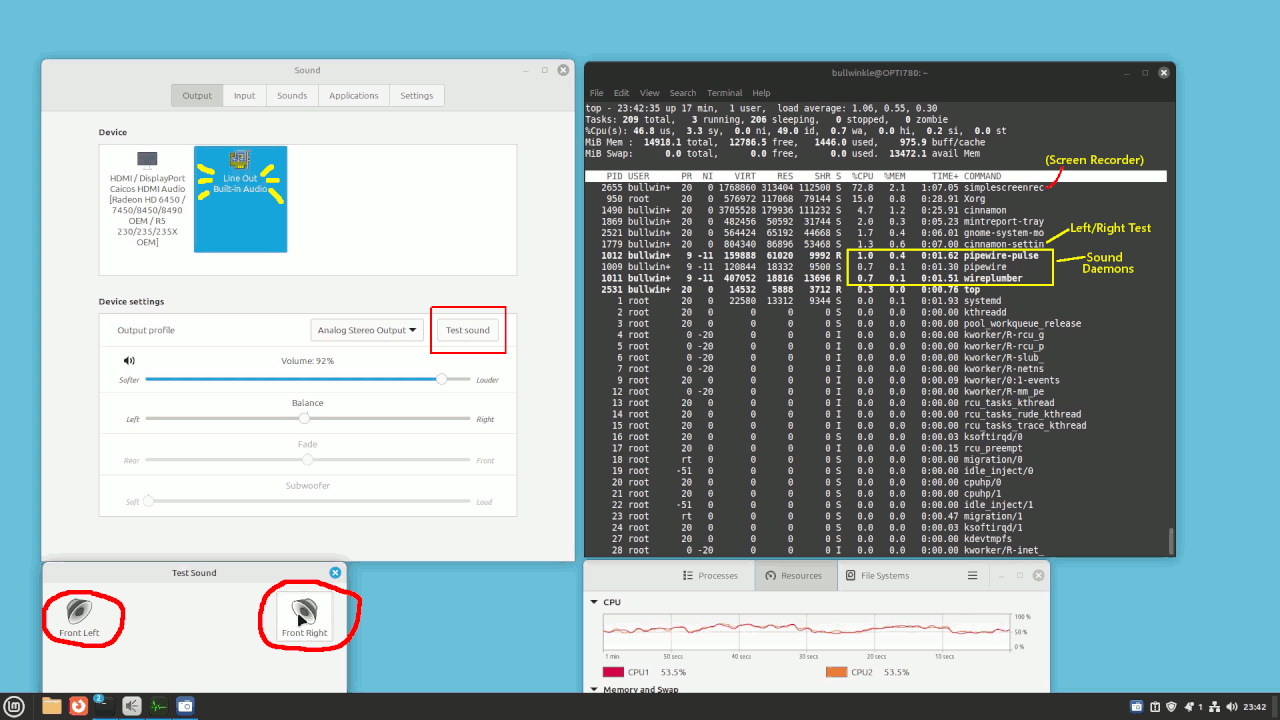
I tried a test of LM22 on the old E8400 CPU with HD6450 video card and 16GB RAM,
and this is what you see when testing the analog sound. I was using
simplescreenrecorder to record the screen, which is why the CPU usage
is so high. The sound is Intel HDAudio and some small CODEC for the analog. >>>
[Picture]
https://i.postimg.cc/0NnSjVnX/Optiplex-LM22-sound-test.gif
The sound works and comes out of the speakers.
I find LM 21.3 is better for old computers,
and LM 22 just isn't quite the same for the job.
The LM21.3 uses the 5.15 kernel, while LM22 uses 6.x.y kernels.
Thanks, Paul.
I've got the same grandfather clock ticking sounds using MX Linux as I
had with Mint, so the only thing I can think of is that perhaps flashing
the BIOS will be necessary to fix the sound failure.
I've read about what to do - but not yet tried to do it!
https://www.dell.com/support/kbdoc/en-uk/000123870/how-to-flash-the-bios-on-a-dell-desktop-or-notebook-with-a-usb-thumb-drive
Googling on the first statement may dig up more articles on repair statements.
https://www.reddit.com/r/linuxhardware/comments/xzxkef/realtek_alc256_sound_card_issue_fix/
"... /etc/modprobe.d mine is called alsa-base.conf
options snd-intel-dspcfg dsp_driver=1
options snd-hda-intel model=dell-headset-multi
options snd-hda-intel power_save=1
"
*******
I couldn't find a datasheet for ALC256, but it's possible the part description is "2 channel CODEC with equalizer", where the equalizer
is the driver code, rather than inside the chip itself. To put a
processor inside the ALC256, with a small RAM for temporary variables,
that's just not RealTeks style. Any kind of DSP solution, or even
a mixed analog/digital chip platform, you could put together
a multi-band equalizer (or even a basic bass/treble control).
The problem could be with a "null" driver that removes the DSP
and copies the voice samples from one place to another (with the
wrong sample rate used). Or, it could be the DSP part was
surgically removed properly, but it is an actual
old-fashioned 44100 Hz versus 48000 Hz issue. We used
to have ticking in the past, cause by improper sampling
rate handling.
Hello again, Paul - UPDATE!
All good exercise to keep the grey matter ticking over! I'm just
completing the *full installation* of Ubuntu alongside Windows 10 on my
old Dell laptop. I awarded it 100GB of space on the disk.
It's taking longer than I expected. I'll report back later.
On 12/01/2025 23:11, David wrote:
[....]
Hello again, Paul - UPDATE!
All good exercise to keep the grey matter ticking over! I'm just completing the *full installation* of Ubuntu alongside Windows 10 on my old Dell laptop. I awarded it 100GB of space on the disk.
It's taking longer than I expected. I'll report back later.
For your interest:-
https://www.youtube.com/watch?v=q5yM4ZYwB_s
I am familiar with Ubuntu. I have it as a dual boot on my ancient Dell DESKTOP computer which is still running Windows XP (but I rarely fire it up!)
On Sun, 1/12/2025 6:47 PM, David wrote:
On 12/01/2025 23:11, David wrote:It's a 6GB DVD and uses Snaps for installation.
[....]
Hello again, Paul - UPDATE!
All good exercise to keep the grey matter ticking over! I'm just
completing the *full installation* of Ubuntu alongside Windows 10 on
my old Dell laptop. I awarded it 100GB of space on the disk.
It's taking longer than I expected. I'll report back later.
For your interest:-
https://www.youtube.com/watch?v=q5yM4ZYwB_s
I am familiar with Ubuntu. I have it as a dual boot on my ancient Dell
DESKTOP computer which is still running Windows XP (but I rarely fire
it up!)
As soon as the install is finished, the Snaps need to be updated
*again*.
Yes, I could see that being a bit slow.
On Sun, 12 Jan 2025 19:52:17 -0500, Paul wrote:
On Sun, 1/12/2025 6:47 PM, David wrote:
On 12/01/2025 23:11, David wrote:It's a 6GB DVD and uses Snaps for installation.
[....]
Hello again, Paul - UPDATE!
All good exercise to keep the grey matter ticking over! I'm just
completing the *full installation* of Ubuntu alongside Windows 10 on
my old Dell laptop. I awarded it 100GB of space on the disk.
It's taking longer than I expected. I'll report back later.
For your interest:-
https://www.youtube.com/watch?v=q5yM4ZYwB_s
I am familiar with Ubuntu. I have it as a dual boot on my ancient Dell
DESKTOP computer which is still running Windows XP (but I rarely fire
it up!)
As soon as the install is finished, the Snaps need to be updated
*again*.
Yes, I could see that being a bit slow.
I upgraded from 22.04 to 24.04 a couple of days ago. There were a couple
of speed bumps that needed manual intervention but it went fairly rapidly.
Until the 'cleanup' phase that is. It spent 25 minutes 'searching for obsolete software'. WTF?
I am familiar with Ubuntu. I have it as a dual boot on my ancient Dell DESKTOP computer which is still running Windows XP (but I rarely fire it up!)
In <luj2k4F8tmhU5@mid.individual.net> David:
[Snip...]
I am familiar with Ubuntu. I have it as a dual boot on my ancient Dell
DESKTOP computer which is still running Windows XP (but I rarely fire it
up!)
I have a similar setup. It's the only Windows I've ever left deliberately on any
gear I own.
The sole reason is to run the Belkin Bulldog battery backup monitor app to setup
the IPv4 addresses on the Belkin A/C powerline internet adapters.
That's my broadband over powerline local LAN (wired ethernet). It's not directly
online under XP (please excuse slrn snit over lines longer tha 80 chars):
https://www.tomshardware.com/software/windows/idle-windows-xp-and-2000-machines-
get-infected-with-viruses-within-minutes-of-being-exposed-online
I'll then see if I can use it to start my Dell laptop (which has no sound).
BDB wrote:
I'll then see if I can use it to start my Dell laptop (which has no
sound).
The Dell has sound under MS W10 or Hiren's W11 PE. I would also expect
it to w/ the Dell W10 install.
The Dell started up with a 'Window' on its screen ..... and the the
start up procedure began. Rightly or wrongly, I formatted the drive completely and Windows 10 is now installing (67%).
David wrote:
The Dell started up with a 'Window' on its screen ..... and the the
start up procedure began. Rightly or wrongly, I formatted the drive
completely and Windows 10 is now installing (67%).
I think it is just as well to replace the Ubuntu w/ a Dell W10, mainly because
- I'm not really a Ub Gnome fan (sorry, a.o.l.u) but an Ub
'offsprings' fan :-)
- altho' you've expressed no interest in a dual boot, I think it would
be a 'good thing'
- for a dual boot, it would be a LOT easier for you to put the linux
on 2nd than 1st
The reason I think a dual Win/linux would be good on that machine is because:
- you like to keep your systems as updated as possible
- W10's updating days are nearly over, so its EOL as being updated is nearly done
- modern linuxes updated will be good on that Dell for years to come
- W10 can be useful as a 'secondary' boot on the Dell, which can never use a 'real' W11, except for the Hiren's PE W11 (or similar)
When your Dell has its W10, hopefully you will have a news agent you are familiar, such as Tb and you can use it to paste info into a newsgroup
about what sound/audio device/s the device manager shows to help solve
the mystery about its sound on linux.
I can refresh your recollection about how to see the W10 sound devices
AND 'extract' their device chip-IDs in the linux format I'm familiar, xxxx:yyyy
my Toyota laptop
I now have Windows 10 - but am still 'updating'.
On 21/01/2025 17:13, David is *SO SORRY*!
my Toyota laptop
AAARGHH!!!
I meant to say TOSHIBA <rolls eyes>!
On 21/01/2025 17:16, David wrote:
On 21/01/2025 17:13, David is *SO SORRY*!
my Toyota laptop
AAARGHH!!!
I meant to say TOSHIBA <rolls eyes>!
We knew what you meant...after all it is a "hybrid" laptop. ;-)
BDB wrote:
I now have Windows 10 - but am still 'updating'.
I figured that would be a lengthy process, as the Dell's W10 would be positively ancient.
I suppose it would even be possible (or even likely) for something to
break during all of that updating, in which case it would become
necessary to go back to the MS W10 .iso method.
You may be pleased to learn that I am now on the latest version of
Windows 10!
22H2 General Availability Channel 2022-10-18 2025-01-14
19045.5371 2025-10-14
My BIOS setting is now 1.23.1
I still have no sound.
What would you like me to try now?
BDB wrote:
You may be pleased to learn that I am now on the latest version of
Windows 10!
22H2 General Availability Channel 2022-10-18 2025-01-14
19045.5371 2025-10-14
My BIOS setting is now 1.23.1
*I still have no sound*.
What would you like me to try now?
My recollection is that you had sound w/ both the MS W10 and the Hiren's
W11 PE.
I would recommend that you boot the live W11 PE that you have. At one
time you had a current Ventoy stick. All you would have to do would be
to copy the Hiren's .iso to that Ventoy and boot it. Then we would have sound via Win implementation.
If you have 'destroyed' your Ventoy stick and you have also forgotten
how to make it w/ linux browser GUI, say so and maybe we can figure out
a simple route to see the device manager of a Win w/ working speakers.
On 23/01/2025 22:14, Mike Easter wrote:
BDB wrote:
You may be pleased to learn that I am now on the latest version of
Windows 10!
On my Dell laptop Service Tag - 4WX4YB2
22H2 General Availability Channel 2022-10-18 2025-01-14
19045.5371 2025-10-14
My BIOS setting is now 1.23.1
*I still have no sound*.
What would you like me to try now?
My recollection is that you had sound w/ both the MS W10 and the
Hiren's W11 PE.
I would recommend that you boot the live W11 PE that you have. At one
time you had a current Ventoy stick. All you would have to do would
be to copy the Hiren's .iso to that Ventoy and boot it. Then we would
have sound via Win implementation.
I've gone past that stage!
If you have 'destroyed' your Ventoy stick and you have also forgotten
how to make it w/ linux browser GUI, say so and maybe we can figure
out a simple route to see the device manager of a Win w/ working
speakers.
Your memory is slipping! This Dell laptop has /never/ had any sound as
far as I can recall.
I thought you'd wanted to use the CLI to find information for you to consider.
(Windows 10 Usenet group added.)
David wrote:My recollection and confirmation by this HK message:
Mike Easter wrote:
BDB wrote:
You may be pleased to learn that I am now on the latest version of
Windows 10!
On my Dell laptop Service Tag - 4WX4YB2
22H2 General Availability Channel 2022-10-18 2025-01-14
19045.5371 2025-10-14
My BIOS setting is now 1.23.1
*I still have no sound*.
What would you like me to try now?
My recollection is that you had sound w/ both the MS W10 and the
Hiren's W11 PE.
I would recommend that you boot the live W11 PE that you have. At
one time you had a current Ventoy stick. All you would have to do
would be to copy the Hiren's .iso to that Ventoy and boot it. Then
we would have sound via Win implementation.
I've gone past that stage!
If you have 'destroyed' your Ventoy stick and you have also forgotten
how to make it w/ linux browser GUI, say so and maybe we can figure
out a simple route to see the device manager of a Win w/ working
speakers.
Your memory is slipping! This Dell laptop has /never/ had any sound as
far as I can recall.
Thanks. I've done that - I hear a sound from both left and right speakers.
On 23/01/2025 22:43, David wrote:
On 23/01/2025 22:14, Mike Easter wrote:
BDB wrote:
You may be pleased to learn that I am now on the latest version of Windows 10!
On my Dell laptop Service Tag - 4WX4YB2
22H2 General Availability Channel 2022-10-18 2025-01-14 19045.5371 2025-10-14
My BIOS setting is now 1.23.1
*I still have no sound*.
What would you like me to try now?
My recollection is that you had sound w/ both the MS W10 and the Hiren's W11 PE.
I would recommend that you boot the live W11 PE that you have. At one time you had a current Ventoy stick. All you would have to do would be to copy the Hiren's .iso to that Ventoy and boot it. Then we would have sound via Win implementation.
I've gone past that stage!
If you have 'destroyed' your Ventoy stick and you have also forgotten how to make it w/ linux browser GUI, say so and maybe we can figure out a simple route to see the device manager of a Win w/ working speakers.
Your memory is slipping! This Dell laptop has /never/ had any sound as far as I can recall.
I thought you'd wanted to use the CLI to find information for you to consider.
(Windows 10 Usenet group added.)
Reposted
On Thu, 1/23/2025 5:48 PM, David wrote:
On 23/01/2025 22:43, David wrote:
On 23/01/2025 22:14, Mike Easter wrote:
BDB wrote:
You may be pleased to learn that I am now on the latest version of Windows 10!
On my Dell laptop Service Tag - 4WX4YB2
22H2 General Availability Channel 2022-10-18 2025-01-14 19045.5371 2025-10-14
My BIOS setting is now 1.23.1
*I still have no sound*.
What would you like me to try now?
My recollection is that you had sound w/ both the MS W10 and the Hiren's W11 PE.
I would recommend that you boot the live W11 PE that you have. At one time you had a current Ventoy stick. All you would have to do would be to copy the Hiren's .iso to that Ventoy and boot it. Then we would have sound via Win implementation.
I've gone past that stage!
If you have 'destroyed' your Ventoy stick and you have also forgotten how to make it w/ linux browser GUI, say so and maybe we can figure out a simple route to see the device manager of a Win w/ working speakers.
Your memory is slipping! This Dell laptop has /never/ had any sound as far as I can recall.
I thought you'd wanted to use the CLI to find information for you to consider.
(Windows 10 Usenet group added.)
Reposted
You have the Windows driver. But Windows has ways of rejecting those,
so I don't know if a current Windows 10 will accept that driver
in the normal way.
Name: Realtek-High-Definition-Audio-Driver_D7VCY_WIN_6.0.1.8224_A08_02.EXE
Size: 318,464,720 bytes (303 MiB)
SHA256: 04A92B91607ECE504A72A5E9C22DC65A1BC2170B7D887EA980FBAF22D237D585
On the Linux side, it is suggested to do the following if the
driver is blacklisted and some other driver was tried in its place.
You can quickfix this with a "sudo modprobe snd_hda_intel"
and a "sudo alsactl force-reload' but you still need to
remove the blacklisted module in /etc/modprobe.d (which file varies) –
osirisgothra
Commented Aug 13, 2023 at 21:15
In addition, apparently some of the behaviors are related to Linux power saving.
These would only be of interest, if the previous paragraph was resolved successfully.
sudo tee /etc/modprobe.d/snd-hda-intel.conf <<<'options snd-hda-intel power_save=0' # headphones
sudo hda-verb /dev/snd/hwC0D0 0x02 SET_POWER 0x0 # speakers
Equipment ID:
Realtek ALC3253 on Dell Inspiron 13" 5368 (Speaker Amp Type unknown -- could be 2W analog, not 5W digital)
Dell Inspiron 13-5368 2-In-1 (P69G001)
What, exactly, do you recommend that I physically *DO*, now, to
determine if it is possible to play music or hear speech on this device?
On 24/01/2025 07:40, Paul wrote:
On Thu, 1/23/2025 5:48 PM, David wrote:
On 23/01/2025 22:43, David wrote:
On 23/01/2025 22:14, Mike Easter wrote:
BDB wrote:
You may be pleased to learn that I am now on the latest version of Windows 10!
On my Dell laptop Service Tag - 4WX4YB2
22H2 General Availability Channel 2022-10-18 2025-01-14 19045.5371 2025-10-14
My BIOS setting is now 1.23.1
*I still have no sound*.
What would you like me to try now?
My recollection is that you had sound w/ both the MS W10 and the Hiren's W11 PE.
I would recommend that you boot the live W11 PE that you have. At one time you had a current Ventoy stick. All you would have to do would be to copy the Hiren's .iso to that Ventoy and boot it. Then we would have sound via Win implementation.
I've gone past that stage!
If you have 'destroyed' your Ventoy stick and you have also forgotten how to make it w/ linux browser GUI, say so and maybe we can figure out a simple route to see the device manager of a Win w/ working speakers.
Your memory is slipping! This Dell laptop has /never/ had any sound as far as I can recall.
I thought you'd wanted to use the CLI to find information for you to consider.
(Windows 10 Usenet group added.)
Reposted
You have the Windows driver. But Windows has ways of rejecting those,
so I don't know if a current Windows 10 will accept that driver
in the normal way.
Name: Realtek-High-Definition-Audio-Driver_D7VCY_WIN_6.0.1.8224_A08_02.EXE
Size: 318,464,720 bytes (303 MiB)
SHA256: 04A92B91607ECE504A72A5E9C22DC65A1BC2170B7D887EA980FBAF22D237D585
On the Linux side, it is suggested to do the following if the
driver is blacklisted and some other driver was tried in its place.
You can quickfix this with a "sudo modprobe snd_hda_intel"
and a "sudo alsactl force-reload' but you still need to
remove the blacklisted module in /etc/modprobe.d (which file varies) –
osirisgothra
Commented Aug 13, 2023 at 21:15
In addition, apparently some of the behaviors are related to Linux power saving.
These would only be of interest, if the previous paragraph was resolved successfully.
sudo tee /etc/modprobe.d/snd-hda-intel.conf <<<'options snd-hda-intel power_save=0' # headphones
sudo hda-verb /dev/snd/hwC0D0 0x02 SET_POWER 0x0 # speakers
Equipment ID:
Realtek ALC3253 on Dell Inspiron 13" 5368 (Speaker Amp Type unknown -- could be 2W analog, not 5W digital)
Dell Inspiron 13-5368 2-In-1 (P69G001)
All very interesting, Paul, BUT .....
What, exactly, do you recommend that I physically *DO*, now, to
determine if it is possible to play music or hear speech on this device?
Thanks.
BDB wrote:
What, exactly, do you recommend that I physically *DO*, now, to
determine if it is possible to play music or hear speech on this device?
Will you confirm or deny that both Hiren's W11 PE and the install of the
MS W10 .iso were successful in playing sound? That has been my
impression since Jan 7.
Since then, my next intention was to use the information from the Win
device manager to provide information in an Win environment w/ working
audio from the case speakers to interpret in the manner I'm accustomed
to doing in linux from the chip ID number in the format xxxx:yyyy.
I was able to use that type information in the W10 Lenovo laptop I have which has two audio devices, which worked properly in Win, the HDMI one
of which did NOT play in linux until I remedied the problem with a boot parameter when booting linux.
This story has been very broken by your struggles w/ providing a
consistent picture with a consistent setup in a consistent thread in a consistent newsgroup.
On 24/01/2025 17:09, Mike Easter wrote:
BDB wrote:
What, exactly, do you recommend that I physically *DO*, now, to
determine if it is possible to play music or hear speech on this device?
Will you confirm or deny that both Hiren's W11 PE and the install of
the MS W10 .iso were successful in playing sound? That has been my
impression since Jan 7.
At no time have I ever heard music or speech from the laptop speakers.
I HAVE heard a 'click' sound - indicating (to me) that each speaker (L &
R) can receive a signal.
Since then, my next intention was to use the information from the Win
device manager to provide information in an Win environment w/ working
audio from the case speakers to interpret in the manner I'm accustomed
to doing in linux from the chip ID number in the format xxxx:yyyy.
My Device Manager shows 1. Intel(R) Display Audio and 2. Realtek Audio
I was able to use that type information in the W10 Lenovo laptop I
have which has two audio devices, which worked properly in Win, the
HDMI one of which did NOT play in linux until I remedied the problem
with a boot parameter when booting linux.
I'm aware that you are a Linux buff.
This story has been very broken by your struggles w/ providing a
consistent picture with a consistent setup in a consistent thread in a
consistent newsgroup.
You are correct, as usual.
At no time have I ever heard music or speech from the laptop speakers.
On Fri, 1/24/2025 3:55 AM, David wrote:
On 24/01/2025 07:40, Paul wrote:
On Thu, 1/23/2025 5:48 PM, David wrote:
On 23/01/2025 22:43, David wrote:
On 23/01/2025 22:14, Mike Easter wrote:
BDB wrote:
You may be pleased to learn that I am now on the latest version of Windows 10!
On my Dell laptop Service Tag - 4WX4YB2
22H2 General Availability Channel 2022-10-18 2025-01-14 19045.5371 2025-10-14
My BIOS setting is now 1.23.1
*I still have no sound*.
What would you like me to try now?
My recollection is that you had sound w/ both the MS W10 and the Hiren's W11 PE.
I would recommend that you boot the live W11 PE that you have. At one time you had a current Ventoy stick. All you would have to do would be to copy the Hiren's .iso to that Ventoy and boot it. Then we would have sound via Win implementation.
I've gone past that stage!
If you have 'destroyed' your Ventoy stick and you have also forgotten how to make it w/ linux browser GUI, say so and maybe we can figure out a simple route to see the device manager of a Win w/ working speakers.
Your memory is slipping! This Dell laptop has /never/ had any sound as far as I can recall.
I thought you'd wanted to use the CLI to find information for you to consider.
(Windows 10 Usenet group added.)
Reposted
You have the Windows driver. But Windows has ways of rejecting those,
so I don't know if a current Windows 10 will accept that driver
in the normal way.
Name: Realtek-High-Definition-Audio-Driver_D7VCY_WIN_6.0.1.8224_A08_02.EXE
Size: 318,464,720 bytes (303 MiB)
SHA256: 04A92B91607ECE504A72A5E9C22DC65A1BC2170B7D887EA980FBAF22D237D585
On the Linux side, it is suggested to do the following if the
driver is blacklisted and some other driver was tried in its place.
You can quickfix this with a "sudo modprobe snd_hda_intel"
and a "sudo alsactl force-reload' but you still need to
remove the blacklisted module in /etc/modprobe.d (which file varies) –
osirisgothra
Commented Aug 13, 2023 at 21:15
In addition, apparently some of the behaviors are related to Linux power saving.
These would only be of interest, if the previous paragraph was resolved successfully.
sudo tee /etc/modprobe.d/snd-hda-intel.conf <<<'options snd-hda-intel power_save=0' # headphones
sudo hda-verb /dev/snd/hwC0D0 0x02 SET_POWER 0x0 # speakers
Equipment ID:
Realtek ALC3253 on Dell Inspiron 13" 5368 (Speaker Amp Type unknown -- could be 2W analog, not 5W digital)
Dell Inspiron 13-5368 2-In-1 (P69G001)
All very interesting, Paul, BUT .....
What, exactly, do you recommend that I physically *DO*, now, to
determine if it is possible to play music or hear speech on this device?
Thanks.
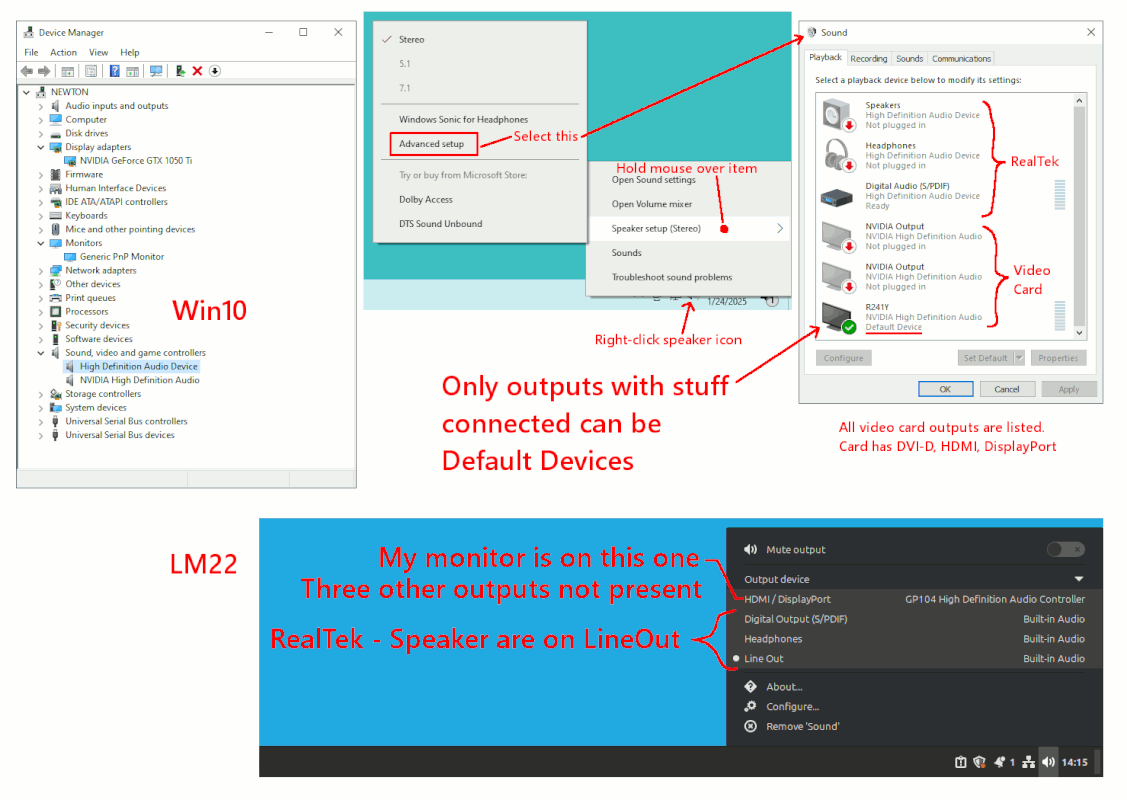
On Windows 10, you can check Device Manager (right-click start, it should be in there).
But that's a bit of a bore.
Look for the speaker icon in the task bar.
Apparently, all outputs can be listed, but only
the devices which are currently hooked up and
ready to use, can be set as "Default Device".
If two devices are both ready (like my HDMI monitor
and my analog speakers), then I have two devices I
can alternate between.
*******
The difference on Linux Mint, is on the video card,
only the output which is running can be used for
an output. In the picture, only one of four video
card outputs is connected at present, so only
one LCD-monitor-related outputs can have sound on it.
On a laptop, when just the (lvds) LCDpanel is being used,
there is no reason for any iGPU entry to be present
in the sound output selection.
The Realtek outputs are all listed, but the speakers
are plugged into LineOut at the moment. While Analog
Devices Soundmax has actual impedance measurement, and
some motherboards have side-contect HDAudio jacks to detect
that a plug is present, some motherboards do not know
that a plug is inserted. The RealTek does not typically
have impedance measurement capability (protected by a patent).
[Picture]
https://i.postimg.cc/dt02vvv6/speaker-selection.gif
Paul
On the Dell website, though, this time, I was able to carry out a
hardware scan. Here's a screenshot of the failures indicated:- https://i.ibb.co/XjYDWtv/IMG-3158.jpg
Any comment beyond time to recycle it?!!
On 23/01/2025 22:43, David wrote:
Your memory is slipping! This Dell laptop has /never/ had any sound as
far as I can recall.
On 2025-01-23 22:48, David wrote:
On 23/01/2025 22:43, David wrote:
Your memory is slipping! This Dell laptop has /never/ had any sound
as far as I can recall.
I haven't been following this thread at all, and not all of it seems to
be available anyway, so it's possible that someone else might have
suggested this already, but Dells sometimes have function <Fn> key combinations that control the sound. On this one in front of me, a Precision M6300, they're as follows ...
<Fn+End> Mute/Unmute sound
<Fn+PageUp> Increase Volume
<Fn+PageDown> Decrease Volume
... while other Dells here have other such <Fn> key combinations marked
but none appear to be for sound. If you haven't already done so,
examine the keyboard for any <Fn> markings that look relevant, usually they're loud-speaker-like markings in a non-white colour such as orange
or blue.
Also, it may be worth trying to find a manual for it to see if there are
any 'magic' key combinations documented for it.
Also, if you plug some headphones or an amplifier into the headphone
socket, do get sound then? If so, most probably someone has previously dismantled the PC to fix something or other, and forgotten to reconnect
the internal speakers when re-assembling it.
On 06/02/2025 23:31, Java Jive wrote:
On 2025-01-23 22:48, David wrote:
On 23/01/2025 22:43, David wrote:
Your memory is slipping! This Dell laptop has /never/ had any sound
as far as I can recall.
I haven't been following this thread at all, and not all of it seems
to be available anyway, so it's possible that someone else might have
suggested this already, but Dells sometimes have function <Fn> key
combinations that control the sound. On this one in front of me, a
Precision M6300, they're as follows ...
<Fn+End> Mute/Unmute sound
<Fn+PageUp> Increase Volume
<Fn+PageDown> Decrease Volume
... while other Dells here have other such <Fn> key combinations
marked but none appear to be for sound. If you haven't already done
so, examine the keyboard for any <Fn> markings that look relevant,
usually they're loud-speaker-like markings in a non-white colour such
as orange or blue.
Also, it may be worth trying to find a manual for it to see if there
are any 'magic' key combinations documented for it.
Also, if you plug some headphones or an amplifier into the headphone
socket, do get sound then? If so, most probably someone has
previously dismantled the PC to fix something or other, and forgotten
to reconnect the internal speakers when re-assembling it.
Hello Charles 🙂
How kind of you to step in to try to help. *Thank you*!
You may like to review the situation from beginning to end, here:-
https://answers.microsoft.com/en-us/windows/forum/all/how-can-i-regain-sound-from-the-speakers-on-my/6a7dfbdf-98e7-4be7-b9e0-ca878c633132?page=1
If absolutely no OS, Windows or Linux, can get any sound at all, that
seems like a hardware problem.
remove the bottom plage
On 2025-02-07 16:03, David wrote:[...]
If absolutely no OS, Windows or Linux, can get any sound at all, that
seems like a hardware problem.
Java Jive <java@evij.com.invalid> wrote:
On 2025-02-07 16:03, David wrote:[...]
If absolutely no OS, Windows or Linux, can get any sound at all, that
seems like a hardware problem.
I don't know about the OP's computer, but IIRC my UEFI has a
diagnostic for sound, so that can be used to try to rule out any OS
issues.
The OP's computer is apparently a Dell, but it might have something
similar to HP's 'Support Assistant' which has a 'Fix audio issues' troubleshooter.
And, don't know about Windows 10, but Windows 11 has an 'Audio' troubleshooter (Settings -> System -> Troubleshoot -> Other trouble-shooters). A little akward to use, but maybe it does the trick.
On Fri, 2/7/2025 1:42 PM, Frank Slootweg wrote:
Java Jive <java@evij.com.invalid> wrote:
On 2025-02-07 16:03, David wrote:[...]
If absolutely no OS, Windows or Linux, can get any sound at all, that
seems like a hardware problem.
I don't know about the OP's computer, but IIRC my UEFI has a
diagnostic for sound, so that can be used to try to rule out any OS
issues.
The OP's computer is apparently a Dell, but it might have something
similar to HP's 'Support Assistant' which has a 'Fix audio issues'
troubleshooter.
And, don't know about Windows 10, but Windows 11 has an 'Audio'
troubleshooter (Settings -> System -> Troubleshoot -> Other
trouble-shooters). A little akward to use, but maybe it does the trick.
Part of the troubleshooting, could profit from the use of headphones.
That removes the two laptop speakers (Itchy and Scratchy) from the equation.
Paul
On 2025-02-07 17:04, Java Jive wrote:
If absolutely no OS, Windows or Linux, can get any sound at all, that
seems like a hardware problem.
One last chance, what happens when you run the Dell Diagnostics?
Formerly these were runnable from a CD, whence you could copy them to a bootable USB, nowadays usually available via a boot option similar to
<F2> taking you into the BIOS - I'm not sure what actual key it would
be, but you should be able to find out from the Dell site, especially as
you have the laptop's service tag.
If you get no sound via the Diagnostics, then the sound is dead. I have
an Inspiron model here, but it's a different model and Dells are
horribly confusing in that radically different hardware can share the
same model line name, so it wouldn't really be worth my while suggesting anything based on this one, and I'm not familiar with yours at all.
What I'm getting around to suggesting is that you obtain a service
manual for the laptop and try to find out where the audio hardware is located. If it's on the mainboard then you'd have to swap the mainboard
to fix it, probably not worth while, but if it's on a daughterboard,
then that may be worth the effort.
A lot will also depend on how easy it is to dismantle the laptop to
repair, because the same brand names can vary a lot. Of the ones I have here, the Inspiron is the worst of all, but I mainly have Precisions,
and, of those, the M6300s are nearly but not quite as bad as the
Inspiron, whereas with the M6700s and M6800s you just remove the bottom plage, two screws, and maybe the keyboard, a few more, and almost
everything is accessible, a huge improvement on previous models.
So, if you're minded to investigate further, try the Dell Diagnostics
first, and if you can't hear any sound there, try to obtain a service
manual to get a sense of how difficult or easy (chance would be a fine thing) it might be to repair with a used part from eBay.
NB: With Dells, the 'service' manuals are often called something that sounds more like a manual instructing use rather than dismantling or
repair, for example, my Inspiron's Service Manual is simply called the "Owner's Manual". You'll have to download everything you can and open
each up to find which one is what you want.
On 2025-02-07 17:39, Java Jive wrote:
remove the bottom plage
... or even 'plate' ...
On 07/02/2025 19:18, Paul wrote:
On Fri, 2/7/2025 1:42 PM, Frank Slootweg wrote:
Java Jive <java@evij.com.invalid> wrote:
On 2025-02-07 16:03, David wrote:[...]
If absolutely no OS, Windows or Linux, can get any sound at all, that
seems like a hardware problem.
I don't know about the OP's computer, but IIRC my UEFI has a
diagnostic for sound, so that can be used to try to rule out any OS
issues.
The OP's computer is apparently a Dell, but it might have something >>> similar to HP's 'Support Assistant' which has a 'Fix audio issues'
troubleshooter.
And, don't know about Windows 10, but Windows 11 has an 'Audio'
troubleshooter (Settings -> System -> Troubleshoot -> Other
trouble-shooters). A little akward to use, but maybe it does the trick.
Part of the troubleshooting, could profit from the use of headphones.
That removes the two laptop speakers (Itchy and Scratchy) from the equation. >>
Paul
I did post (somewhere!) that I found some iPhone wired ear-buds which
are surely much the same as headphones, but heard no sound from them using the Dell's headphone jack.
They DID work, though, when I used them in the USB Plug-In device:-
(7J Channel Sound) https://www.ebay.co.uk/b/bn_6364124
On 07/02/2025 17:39, Java Jive wrote:
On 2025-02-07 17:04, Java Jive wrote:effort when my grandson has already replaced it with an Apple MacBook
If absolutely no OS, Windows or Linux, can get any sound at all, that
seems like a hardware problem.
One last chance, what happens when you run the Dell Diagnostics?
Formerly these were runnable from a CD, whence you could copy them to
a bootable USB, nowadays usually available via a boot option similar
to <F2> taking you into the BIOS - I'm not sure what actual key it
would be, but you should be able to find out from the Dell site,
especially as you have the laptop's service tag.
"In the old days" I surely would have tried, but it isn't worth the
Air and I've got more computers than I can shake a stick at!
On 2025-02-07 20:03, David wrote:
On 07/02/2025 17:39, Java Jive wrote:
On 2025-02-07 17:04, Java Jive wrote:effort when my grandson has already replaced it with an Apple MacBook
If absolutely no OS, Windows or Linux, can get any sound at all,
that seems like a hardware problem.
One last chance, what happens when you run the Dell Diagnostics?
Formerly these were runnable from a CD, whence you could copy them to
a bootable USB, nowadays usually available via a boot option similar
to <F2> taking you into the BIOS - I'm not sure what actual key it
would be, but you should be able to find out from the Dell site,
especially as you have the laptop's service tag.
"In the old days" I surely would have tried, but it isn't worth the
Air and I've got more computers than I can shake a stick at!
I can understand readily enough that you may not be bothered enough to dismantle an old laptop to repair it, especially if it turns out to be
one of the ones that's a PITA to dismantle and reassemble, but there's
no reason not to run the Dell Diagnostics. That should be pretty easy
to do.
I thank you for prodding me into action, but I have already run all the tests I could find at Dell.
Here's one result:- https://i.ibb.co/kgqwBLbG/IMG-3158.jpg
On 2025-02-07 23:04, David wrote:
I thank you for prodding me into action, but I have already run all the tests I could find at Dell.
Here's one result:- https://i.ibb.co/kgqwBLbG/IMG-3158.jpg
So why did you waste our collective time with this thread???!!!
Plonk!
On 2025-02-07 23:04, David wrote:
I thank you for prodding me into action, but I have already run all
the tests I could find at Dell.
Here's one result:- https://i.ibb.co/kgqwBLbG/IMG-3158.jpg
So why did you waste our collective time with this thread???!!!
Plonk!
On 2025-02-07 23:04, David wrote:
I thank you for prodding me into action, but I have already run all the tests I could find at Dell.
Here's one result:- https://i.ibb.co/kgqwBLbG/IMG-3158.jpg
So why did you waste our collective time with this thread???!!!
Plonk!
On Fri, 2/7/2025 2:52 PM, David wrote:
On 07/02/2025 19:18, Paul wrote:
On Fri, 2/7/2025 1:42 PM, Frank Slootweg wrote:
Java Jive <java@evij.com.invalid> wrote:
On 2025-02-07 16:03, David wrote:[...]
If absolutely no OS, Windows or Linux, can get any sound at all, that >>>>> seems like a hardware problem.
I don't know about the OP's computer, but IIRC my UEFI has a
diagnostic for sound, so that can be used to try to rule out any OS
issues.
The OP's computer is apparently a Dell, but it might have something >>>> similar to HP's 'Support Assistant' which has a 'Fix audio issues'
troubleshooter.
And, don't know about Windows 10, but Windows 11 has an 'Audio'
troubleshooter (Settings -> System -> Troubleshoot -> Other
trouble-shooters). A little akward to use, but maybe it does the trick. >>>>
Part of the troubleshooting, could profit from the use of headphones.
That removes the two laptop speakers (Itchy and Scratchy) from the equation.
Paul
I did post (somewhere!) that I found some iPhone wired ear-buds which
are surely much the same as headphones, but heard no sound from them using the Dell's headphone jack.
They DID work, though, when I used them in the USB Plug-In device:-
(7J Channel Sound) https://www.ebay.co.uk/b/bn_6364124
Then the sound just isn't working.
You've proved your headphones work, and when plugged
in, the headphones don't detect anything. They should be
32 ohm headphones, and a match for an HDAudio headphone
widget output.
And you're using the OEM MaxxAudio driver, and I don't know
what else would be more appropriate than that driver.
Check for a speaker shaped icon, in the tray. If the
RealTek is installed, there should be a Speaker icon.
The speaker is sort of on a 45 degree angle, so it's partially
an "angular view of a speaker" icon. That could be the
RealTek icon.
When you click the Speaker Icon (if it is visible of course),
make sure your headphones are plugged in. The control panel
only goes to full-sized dialog, if headphones are in usage.
(The control panel needs to see at least one jack is being
used, to open up to full size.)
Paul
Java Jive <java@evij.com.invalid> wrote:
On 2025-02-07 23:04, David wrote:
I thank you for prodding me into action, but I have already run all the >> > tests I could find at Dell.
Here's one result:- https://i.ibb.co/kgqwBLbG/IMG-3158.jpg
So why did you waste our collective time with this thread???!!!
Plonk!
I think his attempts to drag you/us to alt.computer.workshop are
telling us that he's trolling.
Is this by any chance the infamous "boater Dave"?
And why does he call you "Charles"?
| Sysop: | DaiTengu |
|---|---|
| Location: | Appleton, WI |
| Users: | 1,109 |
| Nodes: | 10 (0 / 10) |
| Uptime: | 492498:34:37 |
| Calls: | 14,188 |
| Calls today: | 2 |
| Files: | 186,298 |
| D/L today: |
3,258 files (1,281M bytes) |
| Messages: | 2,507,860 |